How to use the package
This page aims to show the intended use of the package and how to adapt it to specific use cases. The following sections explain how to setup the processing and recording functionality, respectively.
Processing
Utilities needed for processing functionality are handled by the processing_node.processing_node.ProcessingNode.
To set it up, the constructor expects a processor object aswell as a config path. In the config, the inputs and outputs of the processing node and their
respective ROS topics are described. The processor object contains the main functionality of the node.
As an example scenario, imagine there are two nodes publishing an integer and a float, respectively. Those could contain sensor data, preprocessing results, anything. The publishers could look like the following:
 1import random
 2import rclpy
 3from rclpy.node import Node
 4
 5from std_msgs.msg import Int32
 6
 7class IntPublisher(Node):
 8
 9    def __init__(self):
10        super().__init__('int publisher')
11        self.publisher = self.create_publisher(Int32, 'int_topic')
12        timer_period = 0.5
13        self.timer = self.create_timer(timer_period, self.timer_callback)
14
15    def timer_callback(self):
16        msg = Int32()
17        msg.data = random.randint(0, 10)
18        self.publisher.publish(msg)
19
20def main(args=None):
21    rclpy.init(args=args)
22    int_publisher = IntPublisher()
23    rclpy.spin(int_publisher)
 1import random
 2import rclpy
 3from rclpy.node import Node
 4
 5from std_msgs.msg import Float32
 6
 7class FloatPublisher(Node):
 8
 9    def __init__(self):
10        super().__init__('float publisher')
11        self.publisher = self.create_publisher(Float32, 'float_topic')
12        timer_period = 0.5
13        self.timer = self.create_timer(timer_period, self.timer_callback)
14
15    def timer_callback(self):
16        msg = Float32()
17        msg.data = random.uniform(0.0, 10.0)
18        self.publisher.publish(msg)
19
20def main(args=None):
21    rclpy.init(args=args)
22    float_publisher = FloatPublisher()
23    rclpy.spin(float_publisher)
A possible processing case could be to calculate a weighted sum of those two numbers. A processing node implementing that functionality would look like this:
 1import rclpy
 2import sys
 3
 4from processing_node.processing_node import ProcessingNode
 5
 6class WeightedAdder():
 7
 8    def __init__(self):
 9        self.parameters = {"float_multiplier": float, "int_multiplier": float}
10
11    def get_parameters(self):
12        return self.parameters
13
14    def set_parameters(self, parameters: dict):
15        for key in parameters.keys():
16            if key in self.parameters.keys():
17                self.parameters[key] = parameters[key]
18            else:
19                raise ValueError("The parameter {} is not supported by this processor".format(key))
20
21    def execute(self, input_dict:dict) -> dict:
22        float_number = input_dict["Float number"][-1]
23        int_number = input_dict["Int number"][-1]
24        weighted_sum = self.parameters["float_multiplier"] * float(float_number) + self.parameters["int_multiplier"]*float(int_number)
25        return_dict = {"Weighted sum": weighted_sum}
26        return return_dict
27
28def main(args=None):
29    rclpy.init(args=args)
30    config_path = sys.argv[1]
31    adder_object = WeightedAdder()
32    adder_node = ProcessingNode(adder_object, config_path, frequency=50, node_handle="adder_node")
33
34    adder_object.set_parameters({"float_multiplier": 1, "int_multiplier": 2})
35
36    rclpy.spin(adder_node)
with the respective config looking like:
 1Inputs:
 2  Float number:
 3    Description: "First number to be added"
 4    Topic: "float_topic"
 5    Field: ["data"]
 6    MessageType: "Float32"
 7  Int number:
 8    Description: "Second number to be added"
 9    Topic: "int_topic"
10    Field: ["data"]
11    MessageType: "Int32"
12Outputs:
13  Weighted sum:
14    Description: "Weighted sum of the number inputs"
15    Topic: "weighted_sum_topic"
16    Field: ["data"]
17    MessageType: "Float32"
18Imports:
19  Float32:
20    Package: "std_msgs.msg"
21    Module: "Float32"
22  Int32:
23    Package: "std_msgs.msg"
24    Module: "Int32"
Config
The provided config.yaml specifies what the inputs and outputs of the node are and on what topics they are being published on. For each Input, the respective ROS topic aswell as the message type and exact message field need to be provided. Additionally, an optional description containing more detail is advised. The same goes for each output of the node.
In the case of a layered message type, the Field might look like this: [“first_level/second_level/third_level/actual_data”]
Every message type specified in the config needs to be added to the Imports section aswell. For this, the package and module names need to be provided so the message type can be imported at runtime.
Processor object
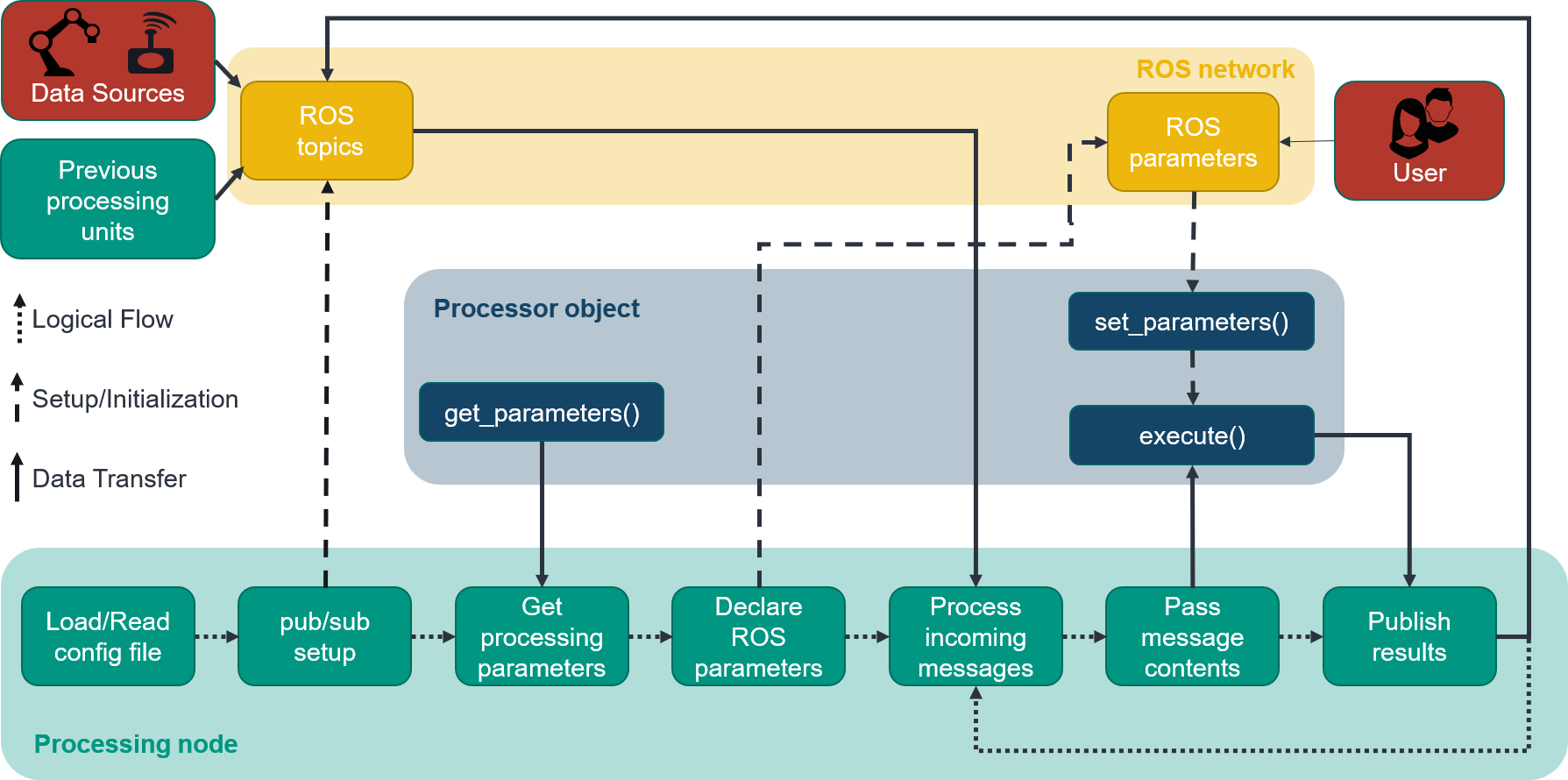
The provided processor object is expected to have a function called “execute”. It takes as input a dict containing a list of each Input specified in the config and returns a dict containig each Output specified in the config.
The frequency with which this function is called can be provided as an optional parameter in the constructor of the processing node.
The processing node also supports the use of parameters. For this, the additional functions “get_parameters”, returning a dict of parameters, and “set_parameters” need to be provided. The processing node automatically sets up ROS parameters with the same name as the given parameters and syncs changes between them, allowing for the change of parameters at runtime.
For our weighted adder example, one could change the weight of the integer at runtime using the following command:
ros2 param set adder_node int_multiplier 4.0
The inner workings and connection between the processing node, the processor object and the ROS network are shown in the following figure.
Recording
Recording of data is handled by the processing_node.processing_node.RecorderNode. If installed correctly, it can be started from the command line:
ros2 run processing_node recorder --out_folder /path/to/output/folder --config_path /path/to/config --num 150
It accepts the following arguments:
out_folder: Path to output folder. Mandatory.
config_path: Path to config.yaml specifying the relevant Inputs. Mandatory.
num: Number of input points to record. Optional, defaults to “-1”, i.e. record until manual stoppage.
The recorder node sets up subscribers for each Input topic and saves the received data into a .csv file in the out_folder. These .csv files can then be used to train models and develop or test functionality.